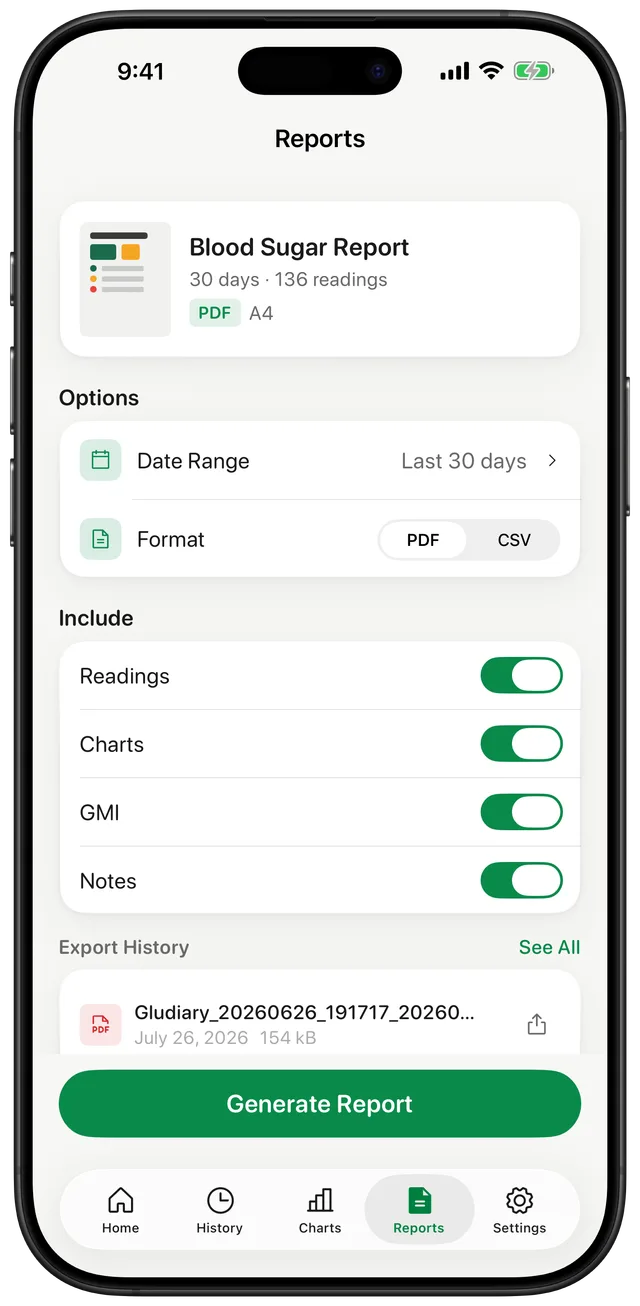
A PDF Report Designed for a Conversation
A PDF gives you and your doctor the same readable summary during an appointment. Gludiary offers compact and detailed layouts, so you can choose a shorter overview or a fuller record. Depending on what you include, the report can show your average, time in range, trend charts, reading history, GMI, and notes.
The value is organisation, not diagnosis. A clear timeline can make it easier to discuss recurring patterns and the context you logged around them. Gludiary presents the data you recorded; your clinician interprets it alongside the rest of your health information.
A CSV Export for Spreadsheets and Raw Records
CSV is the practical choice when you want the underlying entries in a format that opens in spreadsheet software. It is useful for your own archive or when a care team prefers rows and columns over a formatted report.
PDF and CSV solve different jobs: PDF is intended to be read, printed, or reviewed during a visit; CSV is intended to be imported, sorted, or analysed in compatible software. Gludiary lets you choose the format at export time instead of locking your history into one presentation.
Choose What the Report Includes
Before generating a report, select the date range that matches the period you want to discuss. You can then include or exclude readings, charts, GMI, and notes. The free plan includes one PDF or CSV export each month for a date range of up to 30 days; Premium includes unlimited exports and date ranges.
Reports are created only when you ask for them and shared only through the destination you choose on your iPhone. For a practical appointment checklist, see how to share a blood sugar report with your doctor.
GMI is an estimate calculated from average glucose and is not a laboratory A1C result. Reports support a conversation with your care team; they do not diagnose a condition or recommend treatment. The free plan includes one export per month for up to 30 days; Premium unlocks unlimited reports, date ranges, and the compact PDF layout.
How to Create a Blood Sugar Report
Choose the date range
Select the period you want the report to cover, such as the weeks leading up to an appointment.
Pick PDF or CSV
Use PDF for a readable report or CSV for spreadsheet-compatible records.
Select, generate, and share
Choose the sections to include, generate the file, then print, save, email, or share it from your iPhone.
Frequently Asked Questions
Can I export blood sugar readings as a PDF?
Yes. The free plan includes one PDF or CSV export per month for a range of up to 30 days. Premium unlocks unlimited exports and date ranges, plus the compact PDF layout.
Can I export my glucose log to CSV?
Yes. Gludiary provides a CSV option for spreadsheet-friendly records in addition to readable PDF reports. The same free and Premium export limits apply to both formats.
Does Gludiary send the report to my doctor automatically?
No. Gludiary generates the file on your request. You remain in control of whether and how it is printed, saved, emailed, or shared.
Bring a Clearer Glucose Record to Your Next Visit
Log readings in Gludiary, choose the details that matter, and create a PDF or CSV when it is time to share.
Download on the App Store