Keep Glucose Data Alongside the Rest of Your Health Data
Apple Health gives iPhone users one place to manage health records from apps and compatible devices. With your permission, Gludiary can use the blood glucose samples available there instead of making you rebuild a recent history from scratch. The free plan includes one import covering approximately the previous 90 days, giving your charts and history useful context from the start.
Premium can continue importing new samples and, with write permission, save readings you create in Gludiary back to Apple Health. That keeps the record available to other apps you have authorised while Gludiary remains the focused place for meal-context tags, notes, trend views, time in range, GMI, and doctor reports.
You Decide What Gludiary Can Read and Write
Apple Health access is permission-based. You choose whether Gludiary may read blood glucose samples, write them, or do both. You can change that choice later in iOS Settings under Health, Data Access & Devices.
Gludiary does not send Apple Health samples to Gludiary servers, analytics services, or advertisers. Your Health permissions and HealthKit data remain governed by Apple Health and the choices you make on your iPhone. For the complete description of data handling, read the Gludiary Privacy Policy.
Turn Imported Readings into a More Useful History
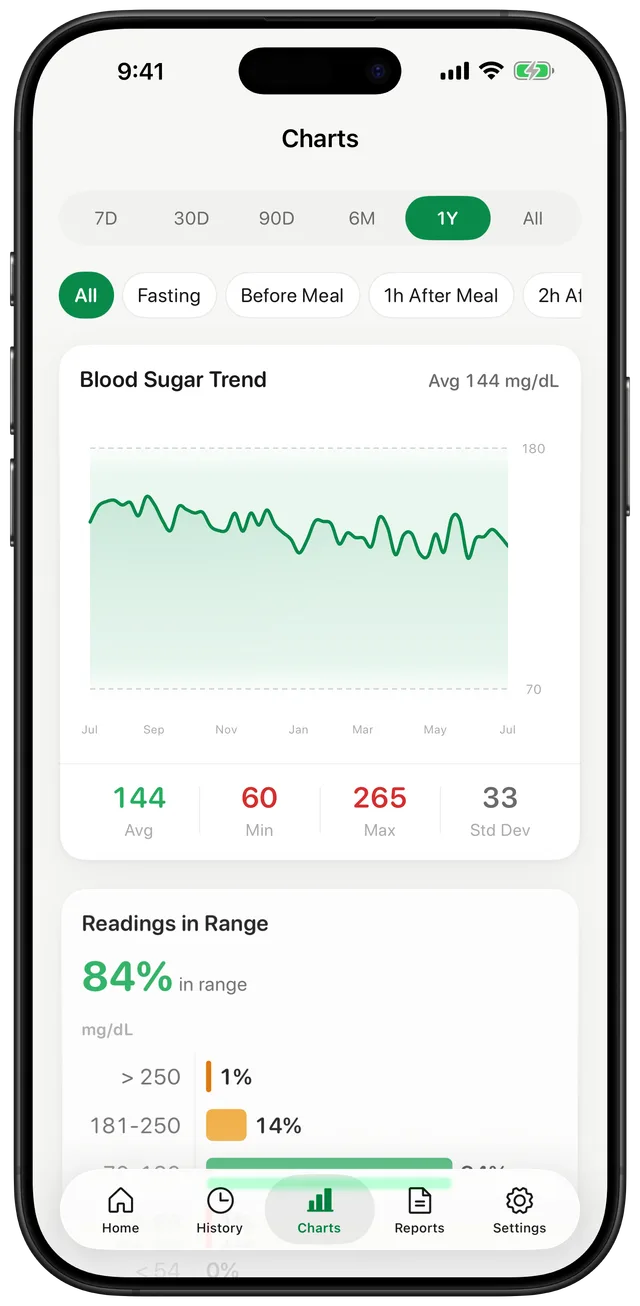
A collection of values becomes more useful when it is easy to review. Gludiary groups readings by day and displays 7-day, 30-day, 90-day, 6-month, and 1-year charts. You can compare the overall direction with your average, minimum, maximum, and time-in-range breakdown.
Readings you add directly in Gludiary can include a fasting, before-meal, after-meal, or bedtime tag plus notes and custom tags. That context helps you and your doctor understand when a value was recorded instead of looking at an unexplained list of numbers. When an appointment approaches, you can turn the history into a PDF or CSV blood sugar report.
Gludiary does not measure blood sugar and is not a glucose meter or CGM. Apple Health sync transfers records; it does not create a glucose reading. Measure with your own device and follow your care team's guidance.
How Apple Health Works with Gludiary
Grant the access you want
Choose whether Gludiary may read blood glucose samples. Premium users may also grant write access.
Import your recent history
Bring in approximately the last 90 days of blood glucose samples available in Apple Health.
Keep logging in Gludiary
Enter or scan new meter readings and add meal context. Premium can keep importing and write saved readings back with permission.
Frequently Asked Questions
Can Gludiary import blood glucose from Apple Health?
Yes. With read permission, the free plan includes one import of approximately the previous 90 days of available blood glucose samples. Premium can keep importing new readings.
Can Gludiary save readings to Apple Health?
Yes. Premium users can grant write permission so readings created in Gludiary can also be written to Apple Health as blood glucose samples.
Does Apple Health sync mean my iPhone measures glucose?
No. Neither Gludiary nor Apple Health turns the iPhone into a glucose meter. Gludiary records or imports readings produced by a glucose meter, CGM, or another authorised source.
Track Apple Health Glucose Data with More Context
Download Gludiary for iPhone, connect the Health access you want, and keep your readings, trends, and reports easier to review.
Download on the App Store