The Core Log Does Not Depend on a Connection
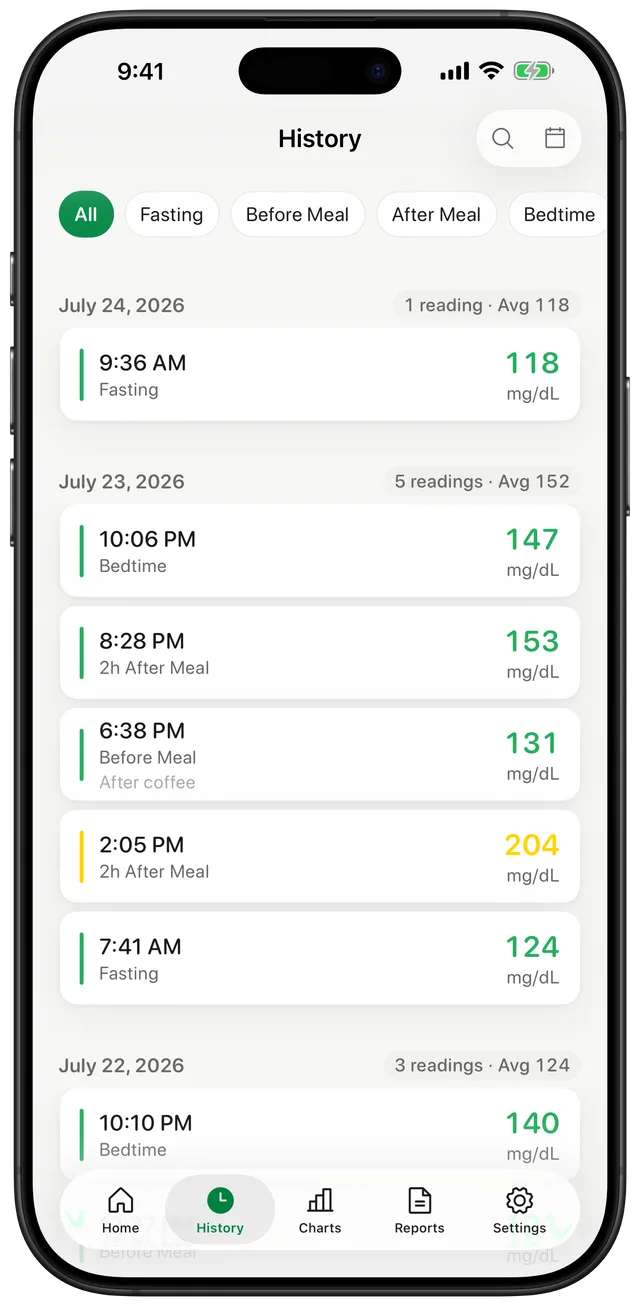
When you have the number from your glucose meter or CGM, open Gludiary and enter it with the large numeric keypad. Manual entry, locally stored history, and chart review remain available without internet access. This can be useful while travelling, in a clinic with poor reception, or whenever you prefer a simple device-based workflow.
Offline support does not turn the iPhone into a measuring device. You still need your own glucose meter or CGM to produce the reading, and Gludiary records the value you provide.
Local Storage Comes with Local Responsibility
Gludiary does not require an account and does not automatically copy its database to CloudKit, a Gludiary server, or another third-party cloud. The health record stays on the device unless you choose an action such as Apple Health access, an export, or a manual backup.
Deleting the app removes its locally stored database. Premium users can create a manual JSON backup and restore it on another device. Keep backup and report files private because they can contain sensitive health information.
Know Which Actions May Need Internet
Purchases, restoring a purchase, and advertising may require a connection. Some optional services also depend on their own availability. Those limits are separate from the core offline workflow of entering a reading and reviewing the history already stored on your iPhone.
If privacy is your main reason for choosing an offline-capable log, see the full no-account privacy overview and the authoritative Privacy Policy.
Offline availability applies to manual logging, local history, and charts. Purchases, purchase restoration, advertising, and some optional integrations may require an internet connection.
How to Keep an Offline Glucose Log
Measure with your device
Use your glucose meter or CGM according to its instructions and your care plan.
Enter the value offline
Open Gludiary and save the reading manually with its unit and relevant context.
Review local history
Open the stored history and charts on your iPhone without depending on a Gludiary server.
Frequently Asked Questions
Can I use Gludiary without internet?
Yes. Manual logging, local history, and charts work without an internet connection. Purchases, purchase restoration, advertising, and some optional services may require one.
Does Gludiary automatically sync my database to the cloud?
No. The Gludiary database is stored locally and is not automatically synced through CloudKit or a Gludiary server. Apple Health records are managed separately when you enable that integration.
What happens to my data if I delete the app?
Deleting the app removes the locally stored Gludiary database. Premium users can create a manual JSON backup before deletion if they may need to restore it later.
Keep Logging Even without a Connection
Download Gludiary and keep manual readings, local history, and charts available directly on your iPhone.
Download on the App Store