Track Only When It Belongs in Your Care Plan
Not everyone with prediabetes is asked to check blood sugar at home, and an app cannot decide whether monitoring is useful for you. If your clinician has recommended checks, Gludiary gives you a simple place to record the numbers from your glucose meter or CGM.
Enter each value in the same unit used by your meter and clinic. Add fasting, before-meal, after-meal, or bedtime context when it applies, along with a note about anything you want to discuss at the next visit.
Use Your Own Clinician-Provided Target Range
Gludiary compares saved readings with the target range configured in Settings and, when enabled, meal-specific targets. The resulting colours and summaries describe those settings; they are not medical alerts, diagnoses, or instructions.
Ask a qualified healthcare professional which targets, if any, apply to you. A single home reading cannot diagnose prediabetes, and Gludiary does not claim to prevent, reverse, or treat the condition.
Bring the Pattern to a Follow-Up Visit
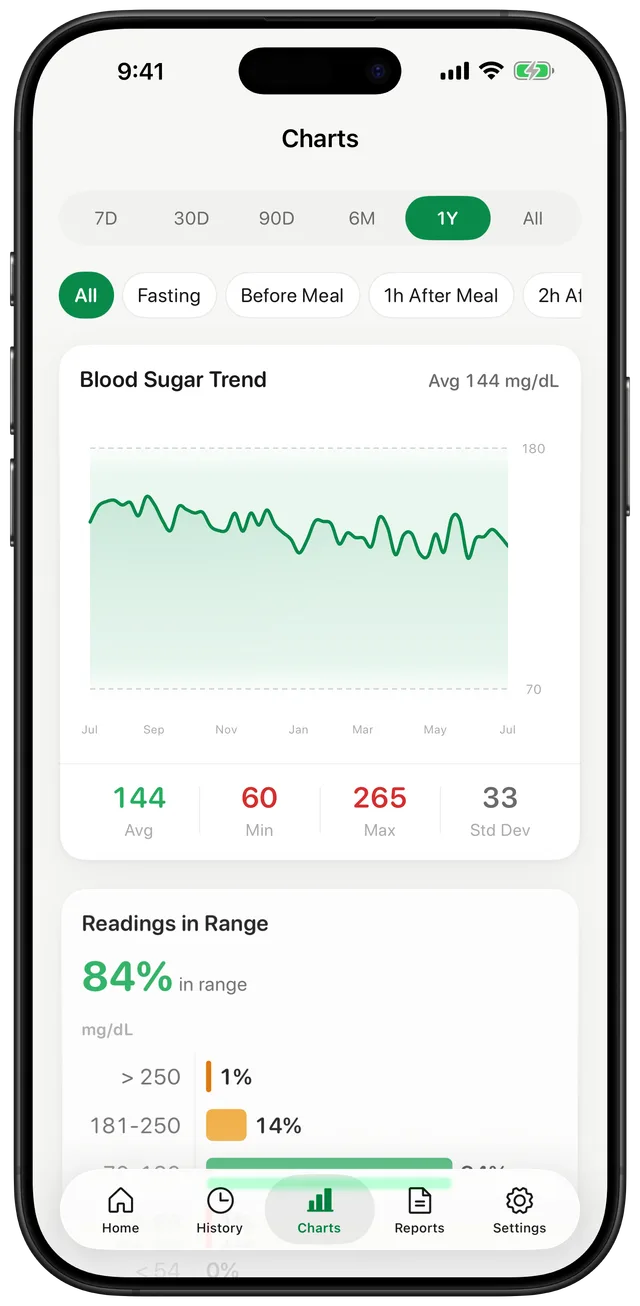
Recent readings can be reviewed in 7-day and 30-day charts on the free plan, with longer history available through Premium. Gludiary also shows averages and a time-in-range summary based only on the readings you logged or imported, not continuous coverage.
When it is time for a follow-up, create a PDF or CSV report containing the date range and sections you choose. The report organises your record; your clinician interprets it alongside laboratory tests and the rest of your health information.
Gludiary does not diagnose, prevent, reverse, or treat prediabetes. Home monitoring is not necessary for everyone; follow your healthcare professional's advice about whether, when, and how often to check.
How to Keep a Clinician-Guided Prediabetes Log
Confirm the plan
Ask your healthcare professional whether home checks are useful and which times and targets apply to you.
Record consistently
Enter the measured value in the correct unit and add the relevant meal or fasting context.
Share the history
Review the pattern and bring a selected PDF or CSV report to your next appointment.
Frequently Asked Questions
Can Gludiary diagnose prediabetes?
No. Gludiary is a logging app and cannot diagnose prediabetes. Diagnosis and interpretation of laboratory or home glucose results belong to a qualified healthcare professional.
Should everyone with prediabetes check blood sugar at home?
Not necessarily. Whether home checks are useful depends on the individual situation. Follow the testing schedule, if any, recommended by your healthcare professional.
Can I set my own target range?
Gludiary lets you configure target and optional meal-specific ranges. Use targets provided by your healthcare professional; the app's colours are summaries, not medical alerts.
Keep the Readings Your Clinician Asked For Organised
Download Gludiary and build a clear, contextual history for your next prediabetes follow-up.
Download on the App Store