A Number Becomes More Useful with Context
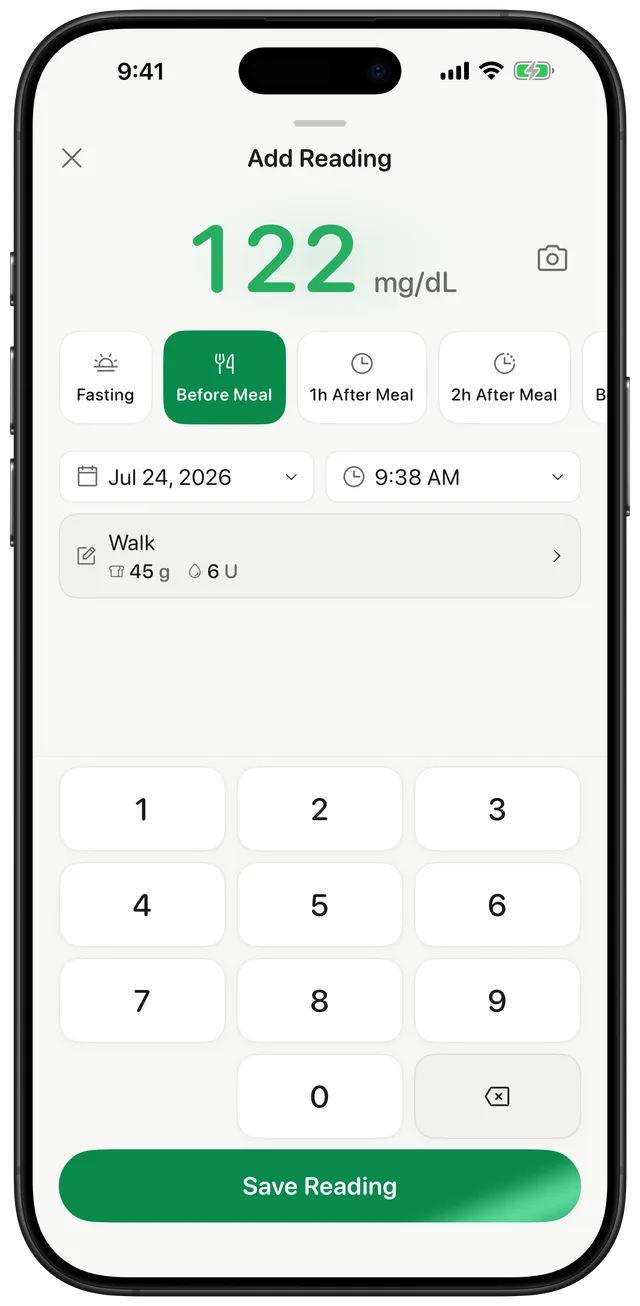
A glucose reading tells you what the meter displayed at one moment. Adding the surrounding context can make that number easier to review later. Gludiary lets you identify the reading as fasting, before meal, after meal, or bedtime and record optional carbohydrate and insulin details.
You can also add a short note or custom tag for information you want to remember. This is your personal record, so the goal is not to fill every field every time. Use the details that support the questions you and your care team are actually reviewing.
Log Manually or Start with the Camera
Enter the value using the large-button numpad in mg/dL or mmol/L, or use the camera scanner to detect the digits already displayed by a compatible meter. Both routes lead to the same add-reading workflow, where you check the value and attach context before saving.
Always confirm the detected or typed number and unit against the glucose meter. Gludiary records the information you provide; it does not measure glucose or verify that a reading, carbohydrate amount, or insulin entry is medically appropriate.
Review Patterns without Turning Notes into Advice
Saved readings appear in a daily history and feed Gludiary's charts, averages, time-in-range summary, and GMI estimate. When preparing for an appointment, you can generate a PDF or CSV and choose whether the report includes readings, charts, GMI, and notes.
Gludiary does not contain a food database, count carbohydrates for you, calculate an insulin dose, or recommend a treatment response. It keeps the details you enter organised so a qualified healthcare professional can interpret them in the context of your care.
Carbohydrate and insulin fields are for record-keeping only. Gludiary does not calculate carbs or insulin doses, evaluate dosing decisions, or recommend changes to food, medication, or treatment.
How to Add Insulin and Carb Context
Enter the glucose value
Type the result from your meter or verify the value detected by the camera scanner.
Add relevant context
Choose the meal context and add carbohydrate, insulin, note, or tag details when useful.
Save it to the history
Review the entry, confirm the unit, and save it for later charts and reports.
Frequently Asked Questions
Can I record insulin and carbohydrate information with a glucose reading?
Yes. The add-reading workflow supports optional carbohydrate and insulin details alongside meal context, notes, and custom tags.
Does Gludiary calculate carbohydrates or insulin doses?
No. Gludiary records the information you enter. It does not include a food database, calculate carbohydrates or insulin doses, or provide treatment recommendations.
Can I include notes in a doctor report?
Yes. When creating a report, you can choose whether to include notes along with readings, charts, and GMI. You control whether and how the resulting file is shared.
Keep More Than an Unexplained Number
Download Gludiary and add the meal, carb, insulin, note, and tag context that matters to your own glucose log.
Download on the App Store