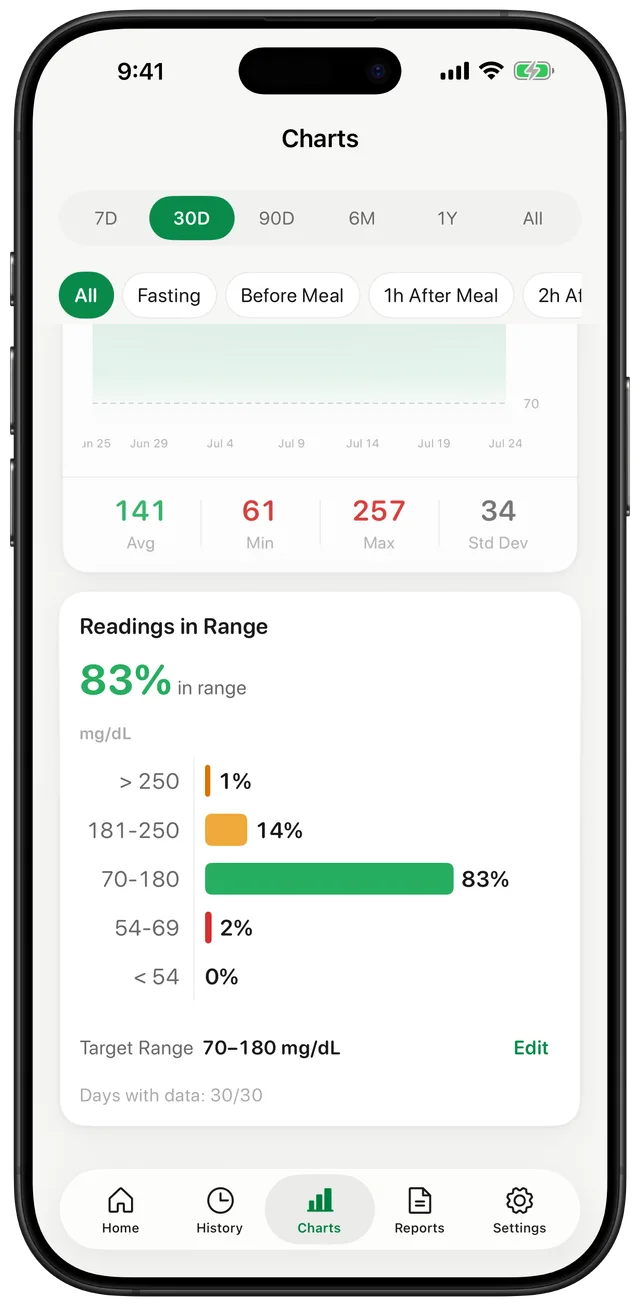
Organise Fasting and Meal-Related Checks
Gestational diabetes care often involves readings at specific moments chosen by your care team. Gludiary lets you label an entry as fasting, before meal, after meal, or bedtime and include the exact date and time. Optional notes, carbohydrate and insulin details, and custom tags can preserve additional context you want to discuss.
Gludiary does not determine when a post-meal check should happen. Follow the timing and frequency provided by your obstetric, midwifery, or diabetes care team.
Use Reminders and Targets from Your Own Care Plan
You can create scheduled blood sugar reminders in Settings for the checking times already included in your routine. Reminders are time-based prompts, not live glucose alerts, and they do not replace symptoms, meter instructions, or clinical guidance.
Gludiary also supports a target range and optional meal-specific targets. Pregnancy glucose targets can differ from general diabetes ranges, so enter only the values given by your care team. The app's colours and summaries reflect those settings and are not treatment recommendations.
Prepare a Clear Record for Frequent Follow-Ups
Daily history and charts make it easier to review the readings you collected between appointments. When your care team needs a copy, generate a PDF or CSV for the selected date range and choose whether to include readings, charts, GMI, and notes.
GMI may be less reliable during pregnancy and is not a laboratory result, so it should not be used to make treatment decisions. The report is an organisational tool for discussion with your care team, who interpret the readings in the context of your pregnancy and care plan.
Gludiary is not a glucose meter or medical device and does not provide pregnancy glucose targets, diagnosis, treatment, or insulin advice. GMI may be less reliable during pregnancy. Follow your pregnancy care team's instructions.
How to Keep a Gestational Diabetes Glucose Log
Use your care team's schedule
Confirm the checking times, meal timing, unit, and target ranges provided for your pregnancy.
Measure and add context
Record the meter value and label it as fasting or with the appropriate meal context.
Prepare for follow-up
Review the history and create a selected PDF or CSV when your care team asks for a report.
Frequently Asked Questions
Can I use Gludiary for gestational diabetes logging?
Yes. Gludiary can record fasting and meal-context glucose readings, reminders, notes, target ranges, and reports. Follow the schedule and targets provided by your pregnancy care team.
Does Gludiary provide gestational diabetes target numbers?
No. Pregnancy targets and testing times are individual clinical decisions. Configure Gludiary using the values given by your obstetric or diabetes care team.
Is GMI reliable during pregnancy?
GMI is an estimate from average logged glucose and may be less reliable during pregnancy. It is not a laboratory result and should not guide treatment decisions.
Bring a Clearer Glucose Record to Pregnancy Follow-Ups
Download Gludiary and organise the fasting and meal-related readings requested by your care team.
Download on the App Store