A Tracker for Meters without a Companion App
Many reliable glucose meters show a result clearly but do not sync with an iPhone. Others have a Bluetooth app that is unavailable in a region, supports only certain models, or adds more setup than you want. Manual logging avoids that dependency.
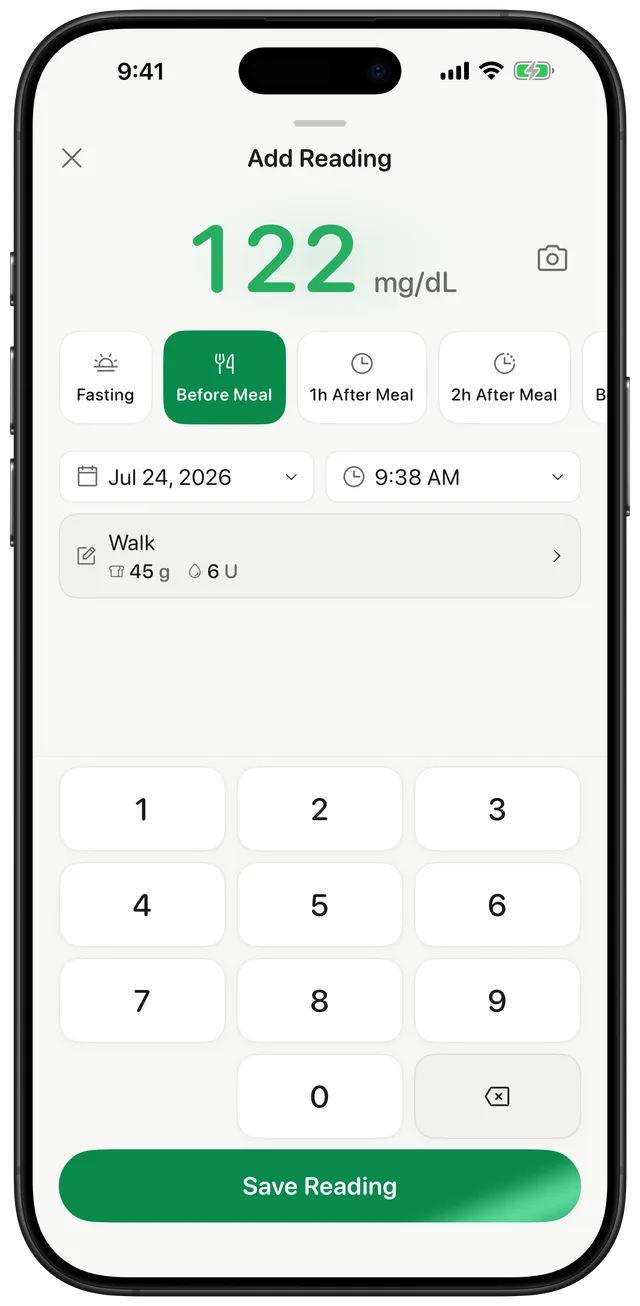
Gludiary works with the number displayed by your meter rather than a specific meter brand. Open the add-reading screen, type the value, choose the context, and save. You can keep using the hardware and testing routine your care team recommends while gaining a searchable digital history.
Fast Entry without Losing Context
The add-reading screen uses a large numeric keypad for quick one-handed entry in mg/dL or mmol/L. A reading can be tagged as fasting, before meal, after meal, or bedtime, with optional notes, carbohydrates, insulin information, or custom tags where relevant to your own record.
If typing is inconvenient, Gludiary also offers a camera scanner for meter displays. Both routes lead to the same organised history, and neither requires pairing the meter over Bluetooth.
From Manual Entries to Charts and Reports
Manual does not have to mean scattered. Saved readings appear in a daily history and feed charts covering 7 days, 30 days, 90 days, 6 months, and 1 year. Gludiary also shows summary values, a time-in-range breakdown, and GMI based on the readings available.
When you need to share the record, generate a PDF or CSV report. If you use Apple Health, you may separately allow Gludiary to write saved readings there or import recent samples. Bluetooth remains optional because it is not part of the core logging workflow.
Gludiary is a logging and visualisation app, not a glucose meter or medical device. It does not test blood sugar, connect directly to a meter over Bluetooth, diagnose a condition, or recommend treatment.
How to Log without Bluetooth
Measure with your own device
Take a reading using your glucose meter or CGM according to its instructions and your care plan.
Enter the displayed value
Use Gludiary's numpad in mg/dL or mmol/L, with no pairing or meter setup required.
Add context and save
Choose the meal context, add a useful note if needed, and save the entry to your history and charts.
Frequently Asked Questions
Can I use Gludiary with a meter that has no Bluetooth?
Yes. Enter the value shown on your meter manually or try the camera scanner. Manual logging does not depend on a meter brand or Bluetooth connection.
Does Gludiary connect directly to Bluetooth glucose meters?
No. Gludiary's core workflow is manual or camera-assisted logging. It does not claim a direct Bluetooth integration with glucose meters.
Can I use both mg/dL and mmol/L?
Yes. Gludiary supports both units. Confirm that the selected unit matches your meter before saving a reading.
Keep the Meter You Have and Build a Better History
Download Gludiary and turn readings from almost any displayed meter or CGM into an organised iPhone log without Bluetooth pairing.
Download on the App Store